Classroom Accommodations: A Complete Guide to Supports

Jump to section
Think about a ramp built beside a staircase. It doesn't lower the bar for who gets inside. It simply gives every visitor a workable path to the same destination.
Classroom accommodations work the same way: they change how a student reaches the learning, not what that learning is.
In this post, we'll cover every major category of accommodation, explain how accommodations differ from modifications, and clarify what reasonable accommodations really require.
Then we'll show you a practical way to build supports into your daily lesson plans, so they're part of the plan from the start.
Classroom Accommodations Versus Modifications
Accommodations and modifications both support students who learn differently, but they do different jobs. Getting the difference right keeps every student working on the right thing.
What are reasonable accommodations?
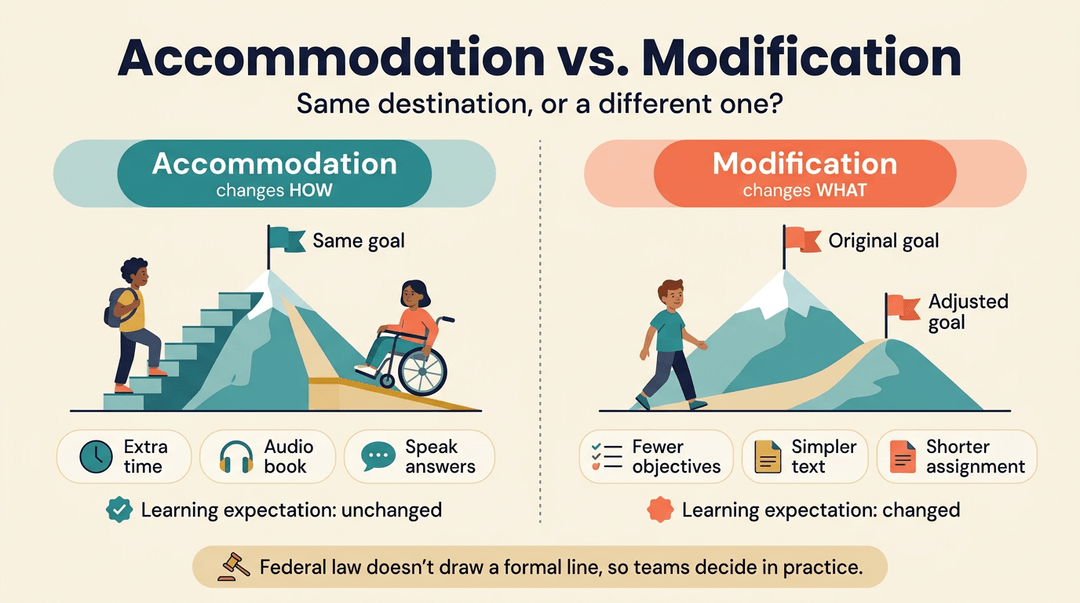
Reasonable accommodations are changes that help a student access the same learning as classmates. PEATC draws the key line: accommodations change how a student accesses or shows learning, while modifications change what they're expected to learn.
| Accommodation | Modification | |
|---|---|---|
| Core focus | Access to the same content | Altered objectives |
| Expected learning | Unchanged | Changed |
Federal law doesn't draw a formal legal line between the two, so teams draw it in practice.
Who gets modifications and why it matters
Modifications typically fit students with significant disabilities or students who are far behind their peers.
Because they change expected learning, they require guidance from the student's Individualized Education Program (IEP) team, so don't make that call on your own. Modifications can also shape a student's graduation plan, so raise that with the team early.
Examples in regular and special classes
Look at how the two play out in real classrooms:
- Large print vs. shorter reading. A student who needs larger type gets the same text printed bigger, which is an accommodation. A shorter reading for a student on modified goals is a modification.
- Different homework. Modified students may receive homework matched to their goals rather than the class assignment.
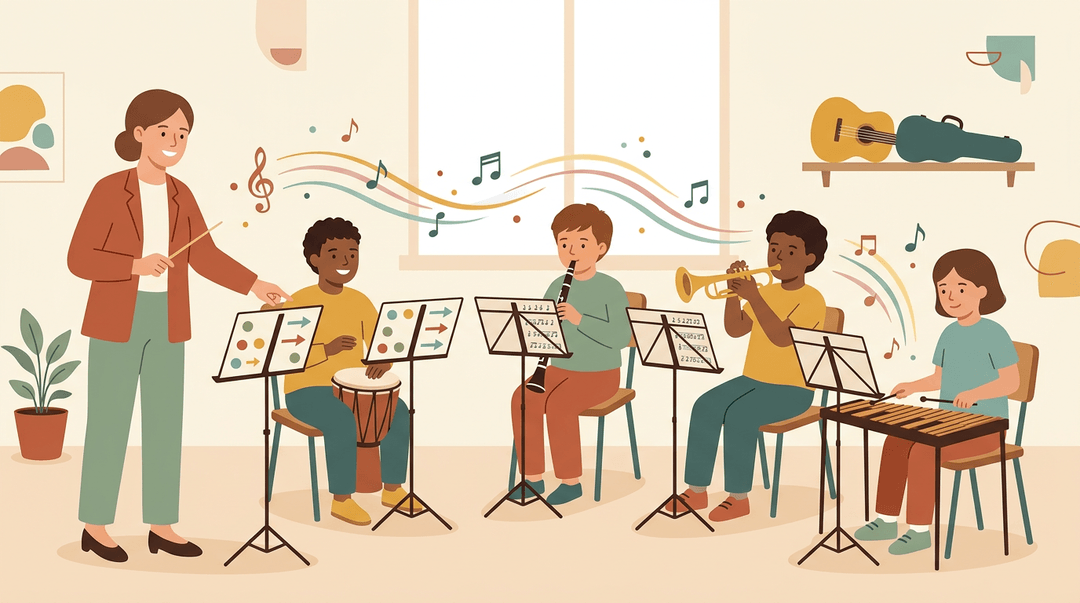
- Gym, music, and art. A student might run fewer laps in gym, or join music class without reading notation.
Picture a music teacher with a student who doesn't read notation. That student still plays in the band, just without the notation requirement.
How goals can change for some students
Sometimes the goal shifts while the materials stay the same. Other times the curriculum itself is swapped.
- Alternate goals with same materials. A student can work toward a different target, such as naming key characters, while reading the same novel as the class.
- Substitute curriculum. Replacement content should align to the student's goals, so every lesson builds toward something real.
- Avoid geographical inclusion. Where a student lives shouldn't decide their placement.
Same room, different path.
Ways to Sort Accommodations into Groups
Grouping supports makes them easier to plan and find.
Sorting supports into nine broad areas
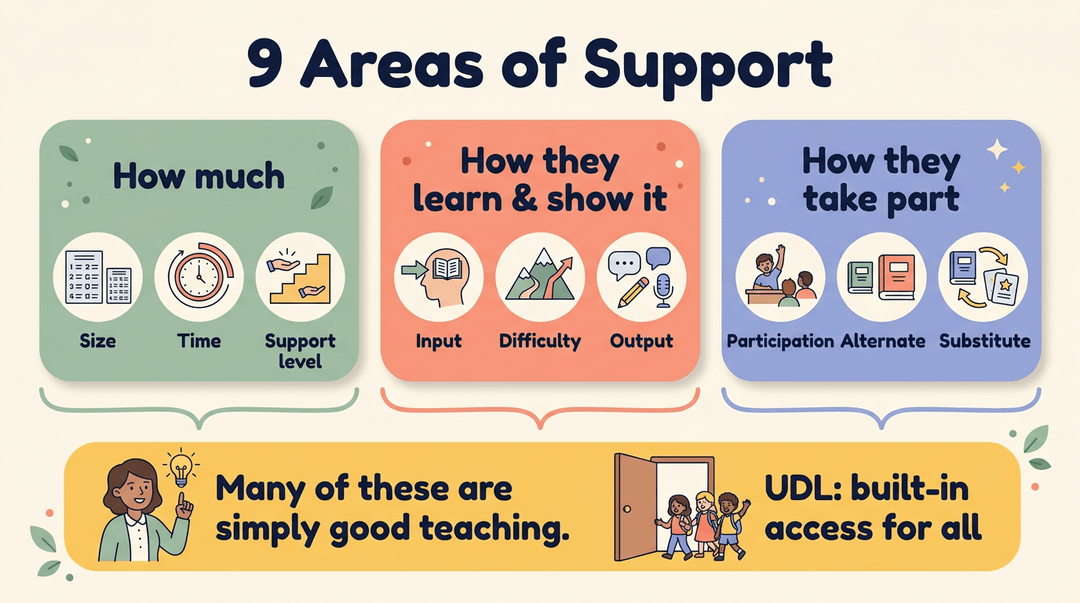
The nine areas form three groups of three: size, time, and level of support; input, difficulty, and output; and participation, alternate, and substitute curriculum.
Many of these are simply good teaching.
In Implementing Universal Instructional Design In Postsecondary Courses And Curricula, many accommodations are described as good teaching practice that can benefit students generally: "Clearly, these are basic strategies for good teaching."
This ties to Universal Design for Learning (UDL): built-in access for all.
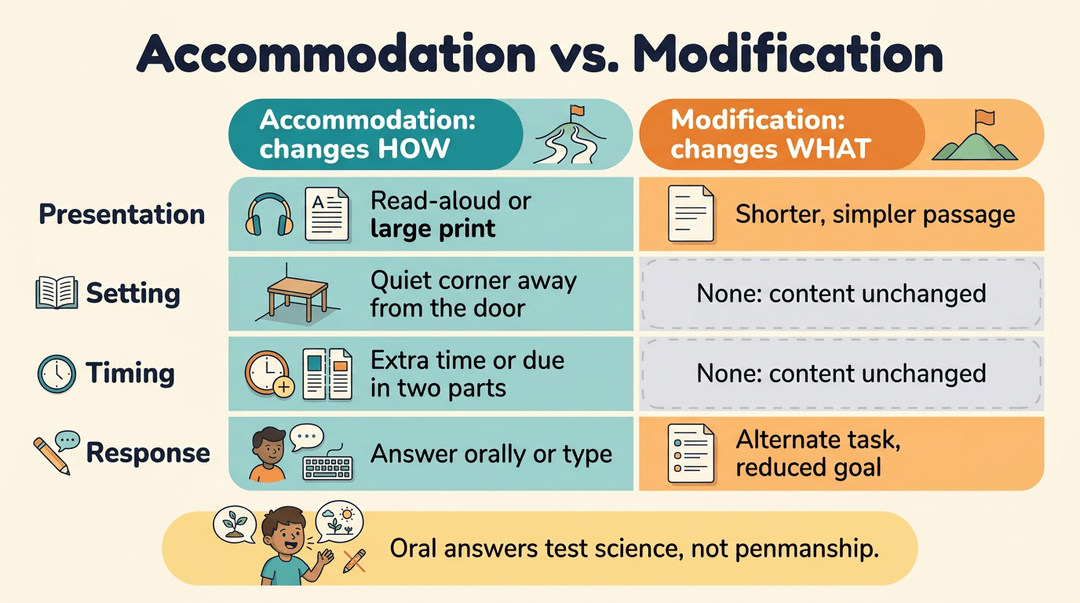
Presentation, setting, timing, and response supports
Keep this distinction in view: accommodations change how students get to content or show learning, while modifications change what they're expected to learn.
- Presentation: read-aloud passages or large-print handouts (accommodation); a shorter, simpler passage on the same topic (modification).
- Setting: a quiet corner away from the door. No modification applies, since location alone leaves content unchanged.
- Timing and scheduling: extra time on a quiz, or a project due in two parts. No modification applies here either.
- Response mode: answering orally or typing instead of writing (accommodation); an alternate task that measures a reduced goal (modification).
Consider a fifth-grade teacher whose student struggles with handwriting. Answering science questions orally means the test measures science, not penmanship.
Checklists grouped by topic and task
- Instruction: numbered directions, chunked assignments, a visual schedule.
- Testing: read-aloud directions, extra time, a quiet place to finish.
- Organization: a daily planner check-in, color-coded folders.
- Reading supports: text-to-speech, highlighted vocabulary, graphic organizers.
- Writing supports: sentence starters, a word bank, speech-to-text.
You can use these in an Individualized Education Program (IEP), a Section 504 plan, or informally. Same support. Different paperwork.
Build Accommodations into Every Lesson Plan
Use this guide when you draft a lesson, so supports are planned in from the start instead of patched in mid-class. It runs in three moves: plan, match to grade level, track.
Before you teach
Confirm these four things while you plan:
- IEP or 504 reviewed. Read each student's accommodation list before you write the objective.
- Support matches the objective. Ask what gets in the way of this task, then pick the fix.
- Goal stays the same. Plan access, not lower expectations.
- Materials prepped. Print guided notes and test the text-to-speech tool the day before.
Here's what "access, not lower goals" looks like:
- ❌ Shorten the essay to one paragraph.
- ✅ Keep the full essay, add a sentence-starter outline and extended time.
The difference: the first changes what you're measuring, and the second changes only how the student shows it.
What supports look like by grade
| Grade band | Common supports | In the room |
|---|---|---|
| Elementary | Visual schedules, timers | Picture schedule on the desk, 5-minute center timer |
| Middle | Guided notes, checklists | Notes with blanks for key terms, task checklist |
| High school | Extended time, text-to-speech | Longer test window, reading assigned text aloud |
Treat these as starting points. The student's own plan decides what you use.
Example: A seventh-grade science teacher's objective is "Explain how cells get energy." She keeps the objective and the quiz as written. She hands the student guided notes with blanks for key terms and a three-step checklist for the lab. She prints both the night before, so nothing about the support slows the lesson down.
Track what works
Supports only improve if you keep a record. A quick note after each lesson is enough.
- Log each support after the lesson.
- Jot it like this: "Guided notes: used, finished 8 of 10 blanks."
- Note what worked and what didn't.
- Keep it to a few words, such as "timer helped, checklist ignored."
- Review with the student regularly.
- Say: "Which supports helped you this week, and which didn't?"
- Share updates with the IEP team.
- Bring your log to meetings so changes rest on real evidence.
💡 Tip: Students often know before you do when a support has stopped helping. Their answer is worth recording.
Keep accommodation notes attached to each lesson plan with EMStudio's online lesson planner so they're reused every time.
Delivering Lessons in Accessible Ways
Accommodations work best when they're built into delivery. Here's how we can make core instruction easier to access.
Making directions easier to follow
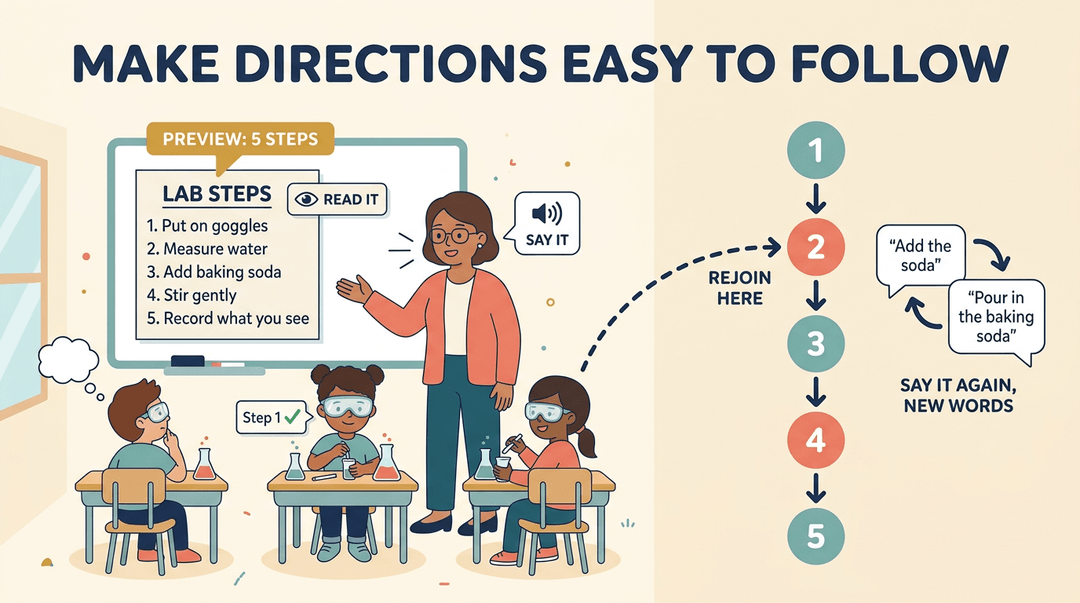
Give oral and written directions so students can hear and read them at their own pace. Then repeat, paraphrase, or restate them in different words.
Break multistep tasks into a step-by-step breakdown, and open with an advance organizer: a short overview of what's coming. For example, a fifth-grade science teacher reads five lab steps aloud, posts them, and checks that each student has step one.
A student who looked away can rejoin without falling behind.
Giving students access to notes and audio
Some students can't keep pace with fast note-taking. Share notes before the lesson so students can focus on understanding rather than transcribing. Offer guided notes, or pre-copied handouts with blanks for key terms.
Record lessons as audio so students can replay tricky explanations, and pair printed text with audiobooks and text-to-speech tools that read passages aloud. Picture a biology teacher whose student struggles with handwriting.
She posts her slides the night before, so he can think about the cell cycle instead of copying the diagram.
Using visuals and hands-on examples
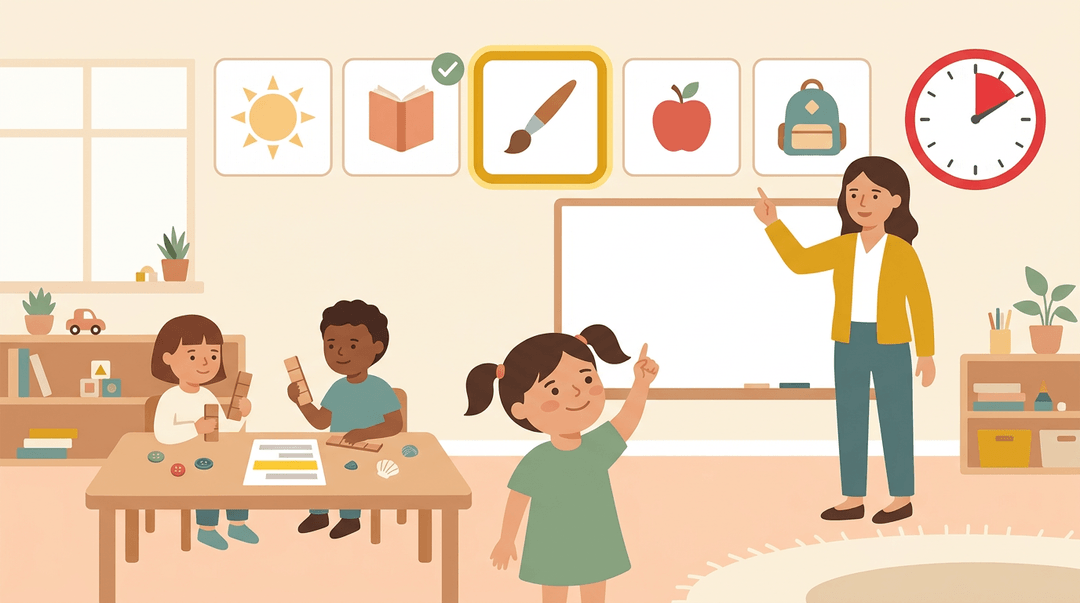
Visuals make abstract ideas concrete. Post a visual schedule showing the day's sequence, and use a timer so everyone can see how much time is left. Pair every verbal explanation with a visual aid so students see what they hear.
Offer hands-on and concrete examples by letting students handle real objects before they work with symbols. Highlight key information on handouts and slides so it stands out. A kindergarten teacher posts a picture schedule above the whiteboard.
A student who keeps asking what's next can check it for herself.
Making pages less crowded to read
Dense pages overwhelm many readers. Start with a larger font or large print copies, and give text room to breathe with more white space. Show fewer items per page by sharing a few problems at a time.
Block out extra information, like sidebars and images the task doesn't need. The aim is focus, not less rigor. Consider a middle school math teacher whose student freezes at a full worksheet.
She hands over half the page at a time, and the student finishes with confidence. Clutter steals attention.
Breaking lessons into smaller, scaffolded steps
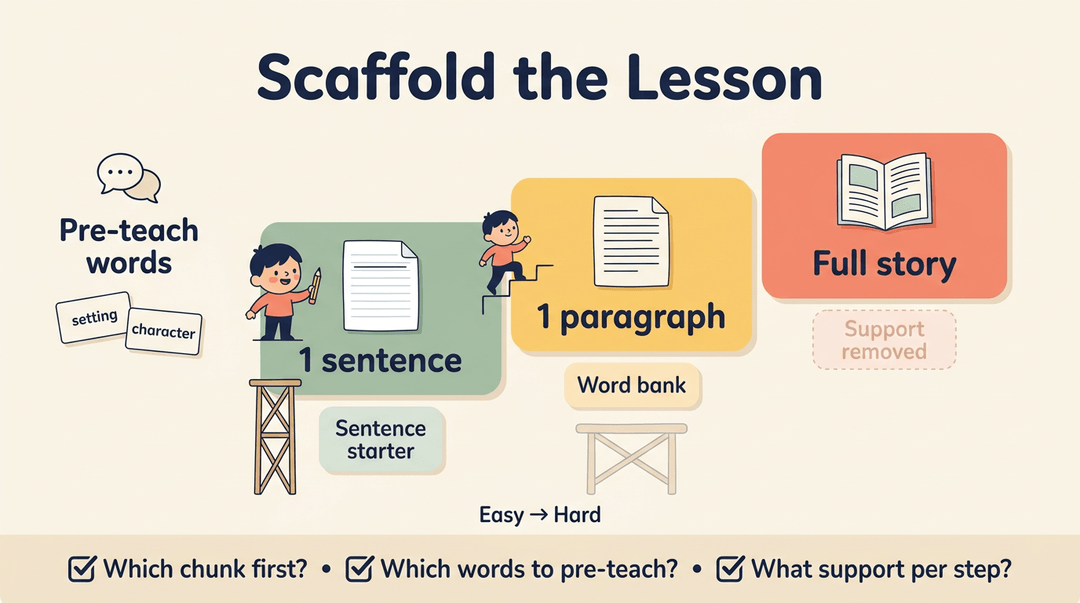
Divide material into smaller chunks, and pre-teach vocabulary before the lesson. Order activities from easy to hard. Use scaffolding, the temporary support you remove as skills grow, to break complex skills into smaller steps.
Then write your scaffolds into the lesson steps, listing:
- which chunk comes first
- which vocabulary to pre-teach
- what support each step needs
Think of a second-grade teacher whose writing unit moves from one sentence to a paragraph to a full story. A struggling writer finishes each short step instead of staring at a blank page.
Ways Students Can Show What They Know
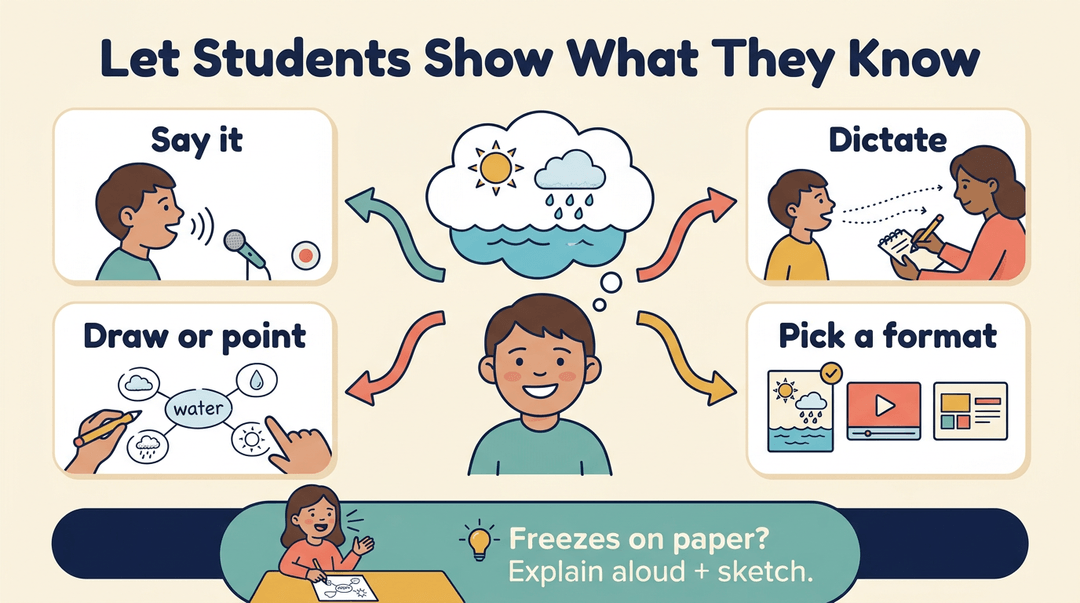
Students often know more than their first answer shows. These accommodations change how students respond, so answers reflect what they know, not how neatly they write.
Letting students answer in different ways
Try these options:
- Verbal or recorded responses: The student answers aloud or records a response.
- Scribe use: An adult or peer writes down the student's dictated answer.
- Pointing, drawing, and mind maps: The student points, sketches, or charts connections.
- Choice in presenting information: Students pick a poster, video, or slide deck.
A fifth grader who knows the water cycle but freezes on paper can explain it aloud while sketching each stage. The teacher gets a clear picture in minutes.
Using technology to make writing easier
Technology can remove barriers that pencil and paper create:
- Computer or keyboard: Typing replaces handwriting for students who tire quickly.
- Typing assignments: Accept typed responses in a shared document.
- Voice input software: Speech-to-text lets students dictate ideas instead of typing them.
- Spellchecker use: Spellcheck catches misspellings so you can judge ideas.
A middle schooler who knows the causes of the American Revolution but writes slowly can type the essay instead. Same knowledge, very different essay.
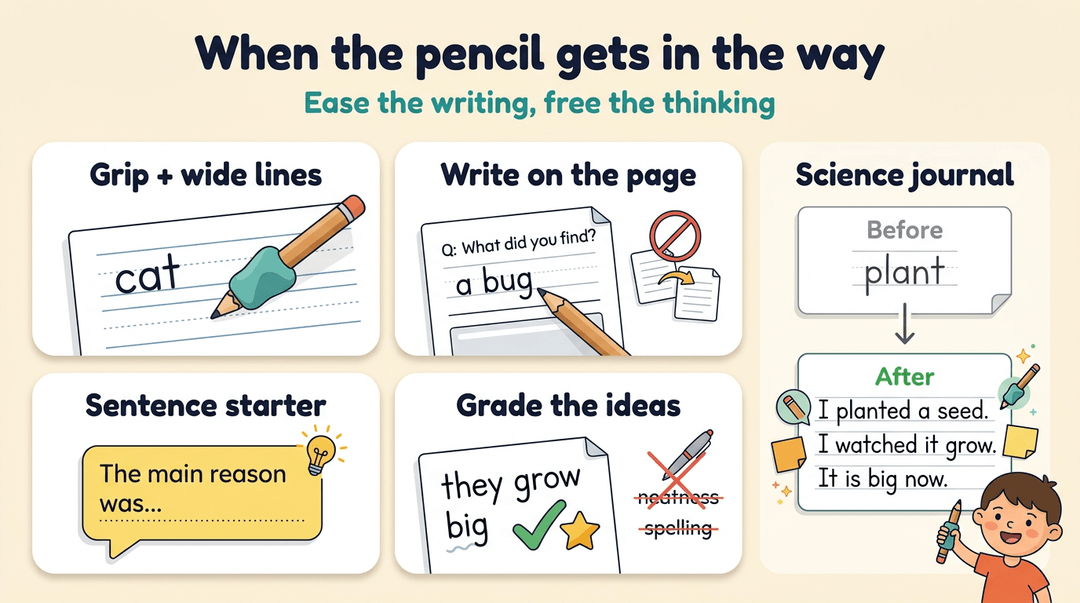
Easing handwriting and sentence-writing struggles
Often it's the pencil, not the thinking, that gets in the way.
- Pencil grips and special paper: A grip eases pencil holding, and wider-lined paper keeps letters sized.
- Writing directly on the worksheet: The student answers on the page, skipping a copying step.
- Sentence starters: Offer an opener like "The main reason was" so students can focus on ideas.
- Not grading neatness or spelling: Score the content unless those skills are the target.
A second-grade teacher gives a student a pencil grip and a sentence starter during science journaling. The student moves from one word to three full sentences.
Math and memory aids students can use
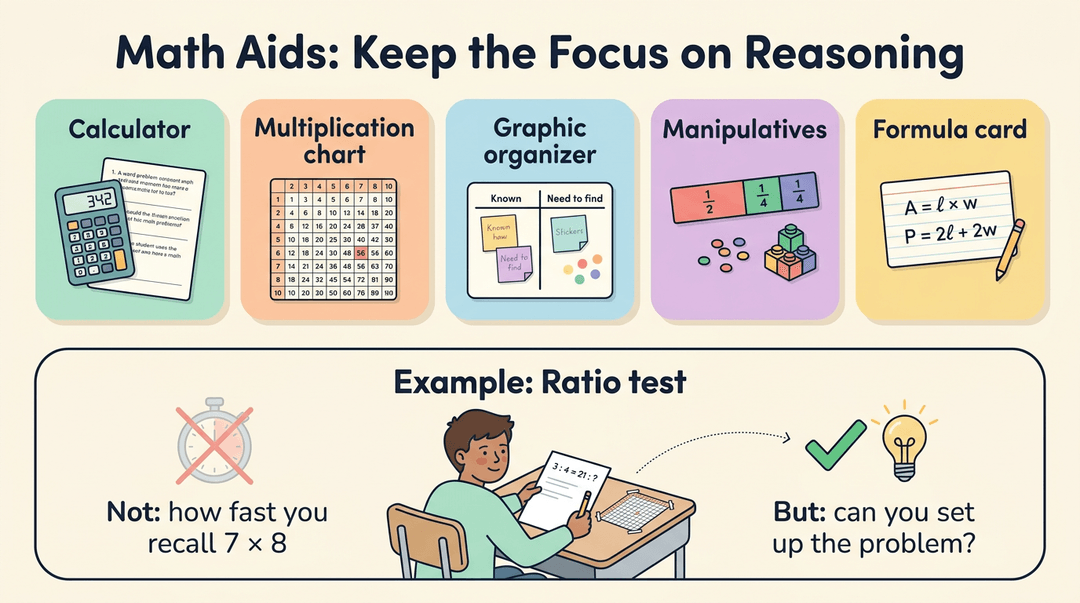
Math often measures recall, but it's the reasoning that matters most.
- Calculator use: Allow it when problem solving is the goal, not fact recall.
- Multiplication chart: A posted or personal chart lets students check facts without stalling.
- Graphic organizers: Charts and diagrams help students sort information before solving.
- Manipulatives: Counters, blocks, or fraction tiles let students model problems.
- Formula cards: A card of key formulas keeps the focus on applying them.
A sixth-grade teacher lets a student use a multiplication chart on a ratio test. Now the test measures whether the student can set up the problem, not how fast they recall 7 times 8.
Cutting the amount of work students do
Sometimes the barrier is volume. Reducing it changes how much students produce, not what they practice.
- Fewer items or problems: Assign every other problem, covering the same skills.
- Shortened assignments: Trim a project to its essential checkpoints.
- Reduced homework: Assign the key practice instead of the full packet.
- Reduced writing load: Ask for a labeled diagram and two sentences, not a full page.
A seventh-grade teacher assigns a student who stalls on long packets every other problem. The student finishes, practices the skill, and gets feedback before the next lesson. Less volume, same skill.
Adjusting Time and Schedules for Students
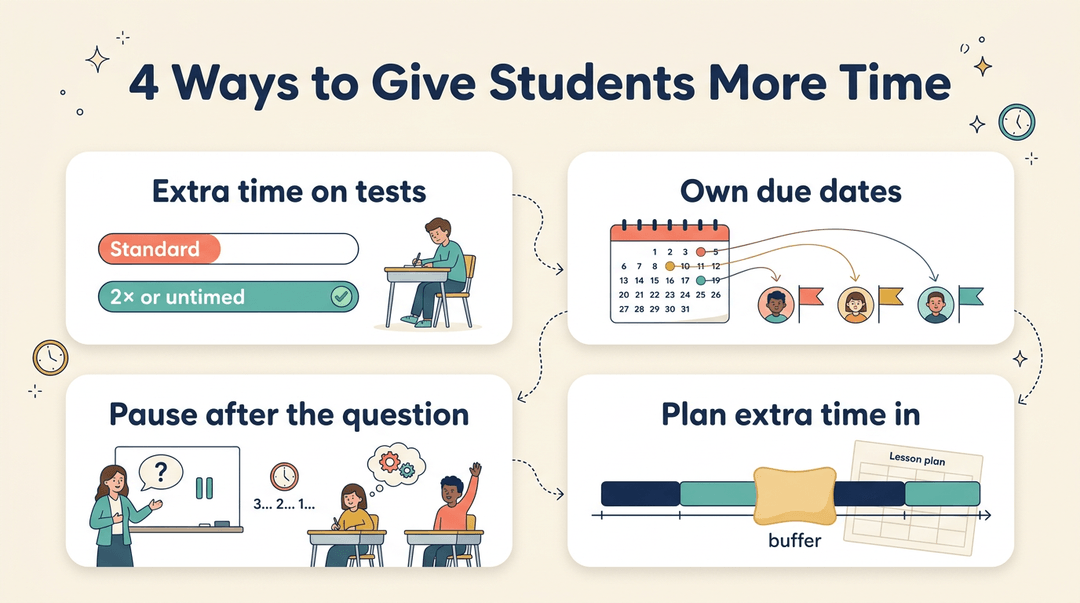
Time is one of the easiest accommodations to adjust and one of the most powerful. Smart changes to the clock, the breaks, and the deadlines let students show what they know.
Giving students more time to finish
Start with the simplest fix: extra time on assignments, so a student isn't penalized for working at a different pace. Some students need untimed or doubled time on tests, and others benefit from an individualized timeline with their own due dates.
Add extra processing time by pausing after a question so students can take it in. Then build extra time into pacing from the start, so your plan has room for the students who need it.
Building in breaks and movement
Think of a middle schooler who's stopped following along by the last ten minutes of a long lesson. Frequent breaks let that student reset before the slump sets in. Movement breaks, like a quick trip to the pencil sharpener, keep the body engaged.
A break pass lets students step out on their own terms. Breaks like these support avoiding fatigue: a scoping review on reducing classroom sedentary behaviour found that several interventions improved physical comfort and reduced fatigue.
Plan breaks before the slump, not after it.
Splitting work and setting flexible deadlines
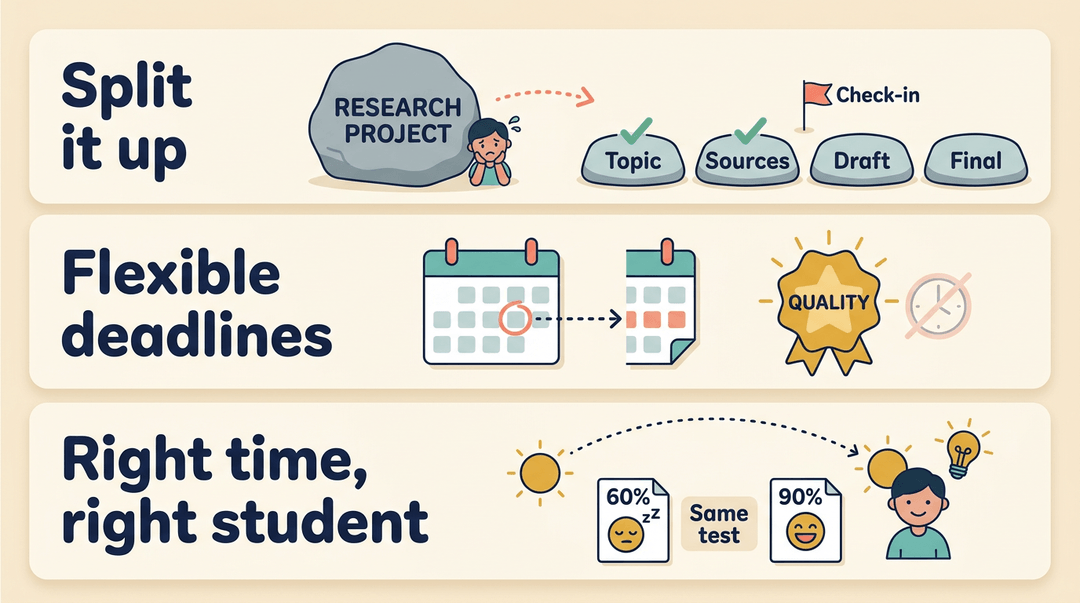
Big projects can freeze students before they start. Splitting tasks into parts turns one overwhelming assignment into smaller steps, and intermediary deadlines let you check progress before the final product is due.
Flexible deadlines give students more room when a project needs it, keeping the focus on quality rather than the calendar. For tests, consider the best time of day for each student.
Think of a student who's sharpest after lunch: an afternoon test can show you what they really know. Same content. Better timing.
Flexibility for absences and late arrivals
Students miss class for all kinds of reasons, and a rigid policy can turn a short absence into a long setback. Show consideration for absences by giving students a clear path to make up missed work.
Extend consideration for lateness too, so a student who walks in after the bell isn't penalized before the lesson even starts.
Watch for fluctuating performance as well: work may rise and dip from day to day, so look at the trend rather than any single day.
How the Classroom Setup Supports Students
Seating, layout, and lighting shape how easily students focus, move, and take part. Here's how to set them up well.
Choosing where students sit
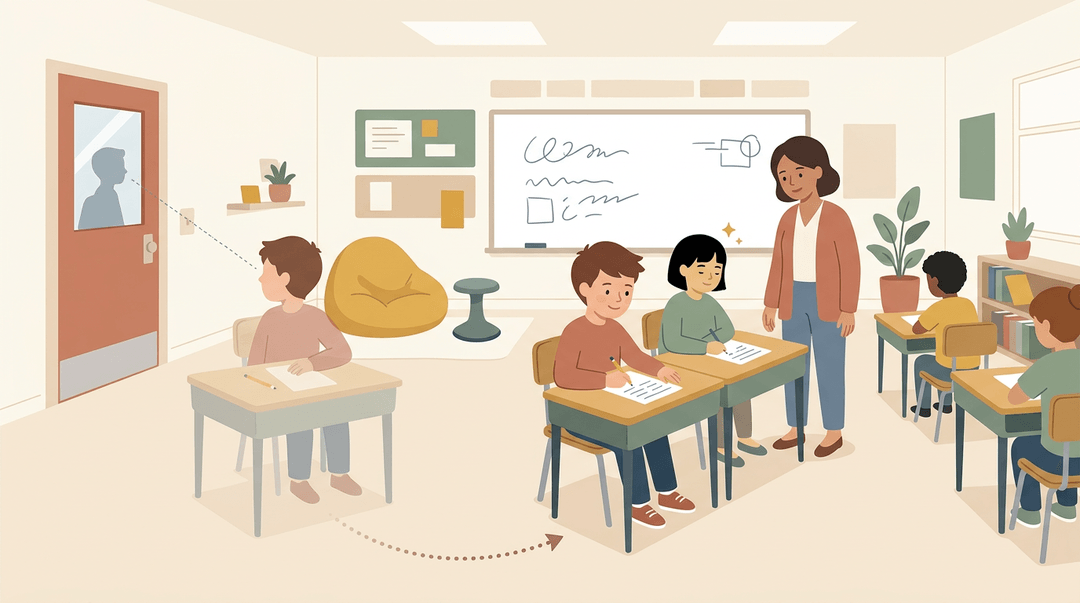
Seat students with purpose. A student who struggles to hear or see the board often does best near the teacher. Pair them with positive peer models, classmates who stay on task.
Keep seats away from doors and windows, where hallway traffic pulls attention away.
Some students need an assigned seat to feel settled. Others do better with flexible seating. Ask what helps, then watch. Consider a fourth-grade teacher whose student loses focus every time someone passes the door.
Moving him to a seat up front, away from the door, means he starts work sooner.
Cutting down on distractions in class
The goal isn't a bare room. It's fewer competing signals.
- Study carrels and desk dividers give a student a visual boundary.
- Offer them as a choice, not a consequence.
- Noise-canceling headphones can help during independent work, if device policy allows.
- Small group instruction lowers the noise level and gives each student more direct attention.
- Keep posters and displays limited, since clutter pulls focus from your lesson.
Making the room physically accessible
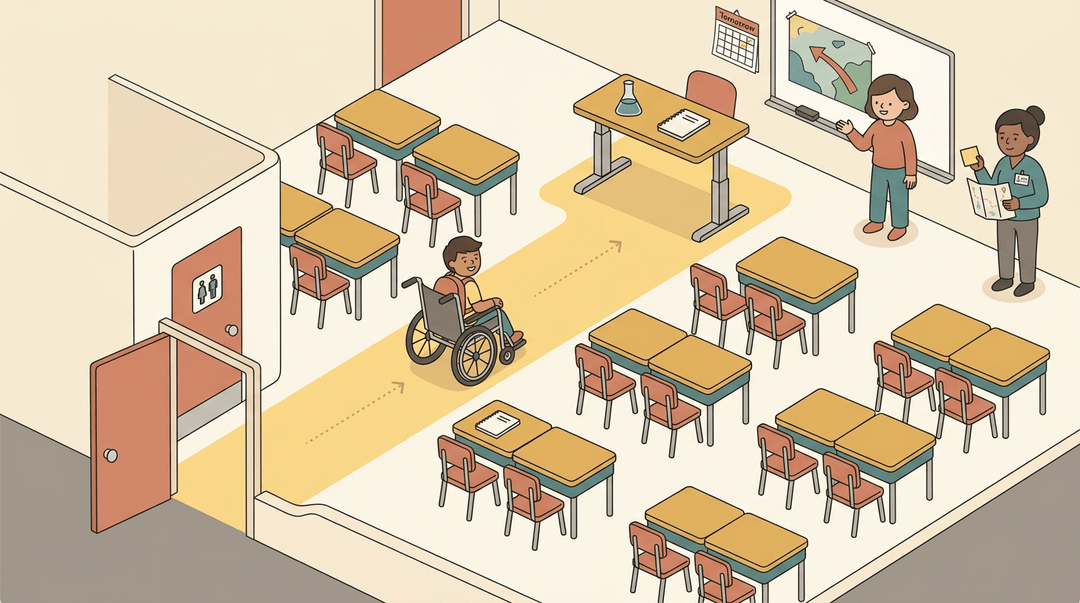
If you can, pick a room on an accessible route, with a clear path from the entrance and restrooms. Leave room for a wheelchair to move, and check that a desk or table is at a usable height.
Predictability is a support. Think of a student who uses a wheelchair, arriving at science class to find the lab moved to another floor. A heads-up the day before, plus a clear route, keeps that transition smooth.
Make sure substitutes hear about changes, too.
Sensory tools and calming spaces
Fidgets and wiggle seats let a student move without leaving their spot. Keep them quiet and simple so they support focus rather than become the distraction. Some students find a weighted blanket calming.
Check with the family and your school first, since needs vary widely.
A calming corner gives students a predictable place to reset, with soft seating and a few quiet tools. If your school has a sensory room, it can serve the same purpose.
Bright overhead lights can drain some learners, so dim them when you can, or use a lamp.
Supports Students Use During Tests
Test day can hide what a student knows. These supports change the conditions so a test measures learning, not stamina. We'll look at each one.
Where and how students take tests
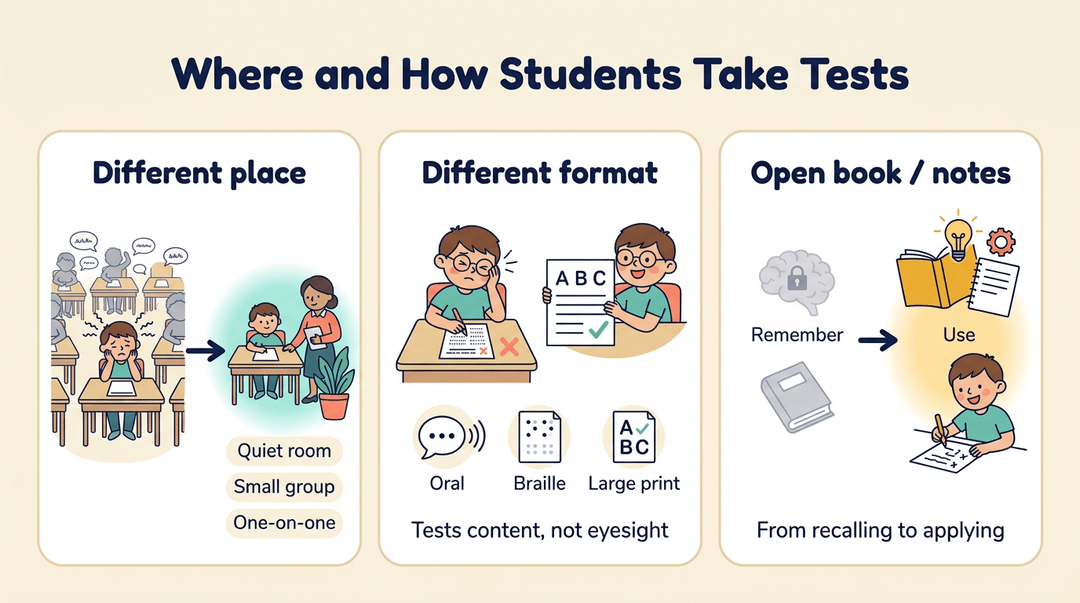
Some students do better away from the crowd. A separate or alternate location, or small group or one-on-one testing, cuts distraction and pressure.
Oral, Braille, and large-print formats give a student another way in. A fourth-grade teacher whose student has low vision might offer a large-print copy, so the test measures content, not eyesight.
Open-book or open-note testing shifts the test from remembering toward using.
Adjusting test timing and breaks
Extended or untimed testing gives a student time to think, not just time to finish, and breaks during testing let them reset.
Picture a seventh grader who can focus for twenty minutes at a time. A short break might mean a finished test instead of a blank back page.
Splitting a test across multiple sessions or days, or reordering its sub-tests, helps too. When a timer is the only thing standing between a student and a good score, you're measuring the timer. Stamina isn't knowledge.
Helping students prepare for tests
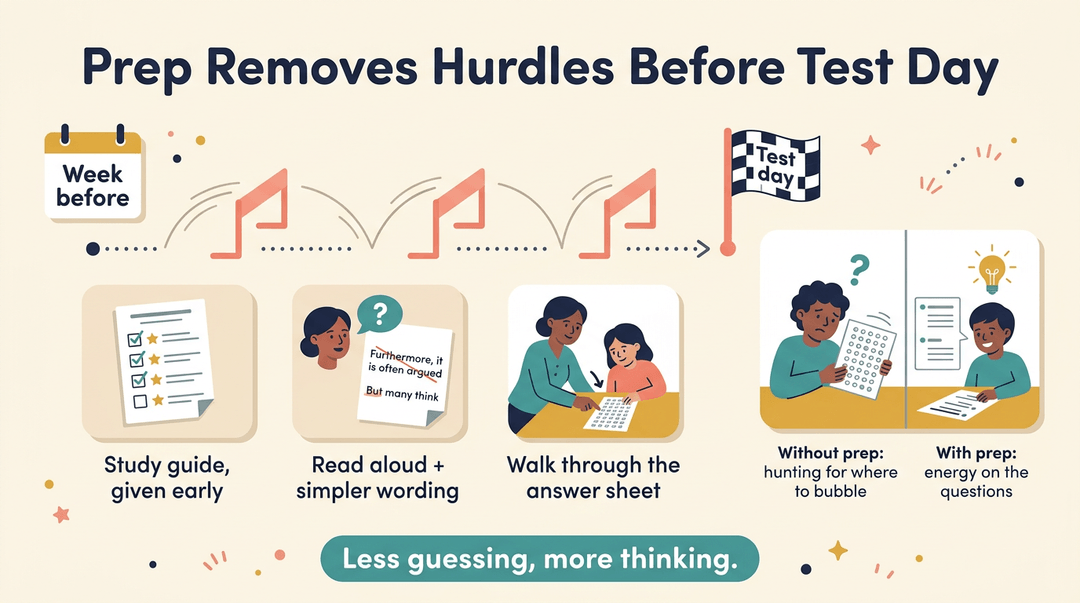
A study guide handed out early shows students what to focus on. Practicing with questions read aloud or with simplified wording removes hurdles before test day.
Previewing test procedures helps too. Consider a special education teacher who walks a student through the answer sheet the week before.
On test day, that student's energy goes to the questions, not to finding where to bubble answers. Less guessing, more thinking.
How classroom and standardized tests differ
Here's the key contrast: an accommodation changes how a student takes a test, while a modification changes what it measures. Alternative assessments are modified, so they're a bigger shift than a new room or extra time.
Test accommodations don't always mirror daily supports. Match what a student uses in class to your state's testing rules, and check them early.
Scores from modified tests don't always compare to standard scores, so read them with the test's conditions in mind.
Know the rules before test day, not after.
Supports for Organization, Behavior, and Focus
Some students know the material but lose track of assignments or focus along the way. These supports help:
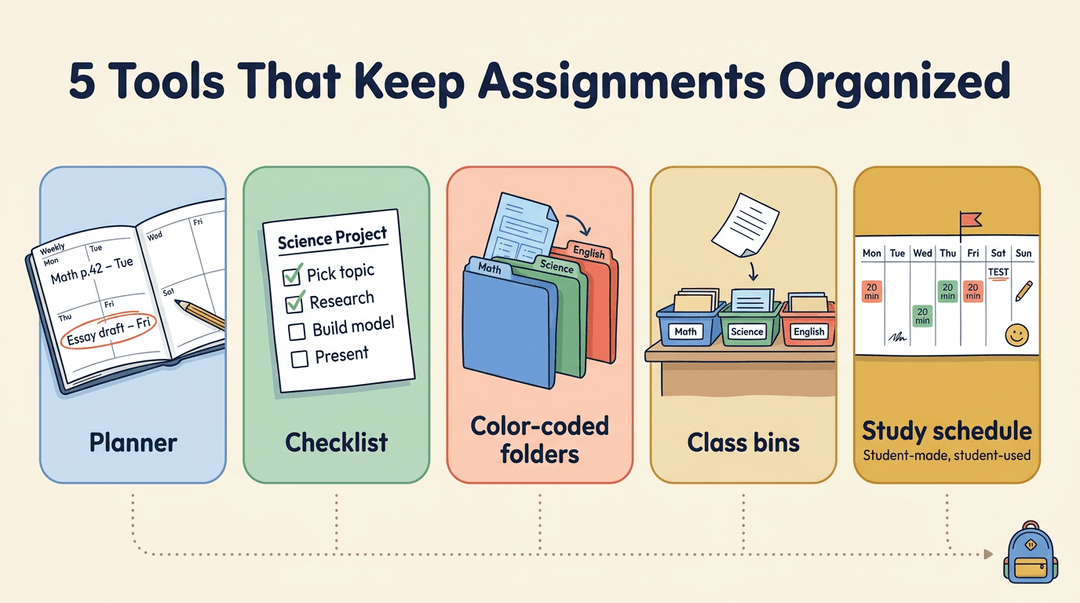
Tools that keep assignments organized
- Assignment books and planners. One place to record what's due.
- Checklists. Break a project into visible steps so students can check off each piece.
- Colored folders. One color per subject keeps a math worksheet out of the science packet.
- Desk organization help. A labeled bin for each class gives finished work a home.
- Study schedule development. Map short, repeated study sessions before a test. The goal is a plan students can use, not one you wrote for them.
Rewarding progress and giving quick feedback
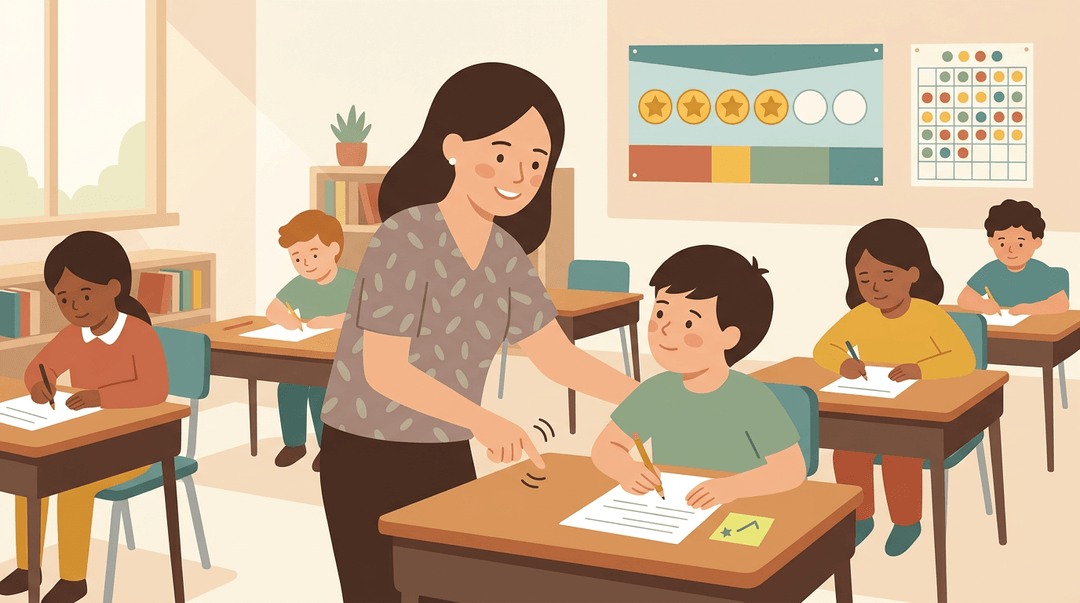
A token board or sticker chart gives students a visible record of small wins. The reward matters less than when it arrives, so pair it with immediate feedback, like a quick note during independent work.
Praise the specific behavior: 'You restarted that problem on your own' tells a student exactly what to repeat.
Nonverbal cues like a nod, a hand signal, or a tap on the desk can redirect a student quietly. Consider a third-grade teacher who taps the desk twice to pull a drifting student back, a signal they agreed on that morning.
The student returns to work, and no one has to stop the lesson.
Checking in with students regularly
Regular check-ins catch problems early. Check in before a student falls behind, not after the grade comes back. A two-minute conference at your desk spots who's stuck.
Reminders for time management, like a timer on the board, help students pace themselves. When you notice a student staying on task, say so: 'You've finished two problems, so keep going.'
When multi-step work and planning get hard
Long lists of directions are hard to hold at once, so number the steps and post them. Lost papers and forgotten assignments often need only a labeled tray and a planner check before the bell.
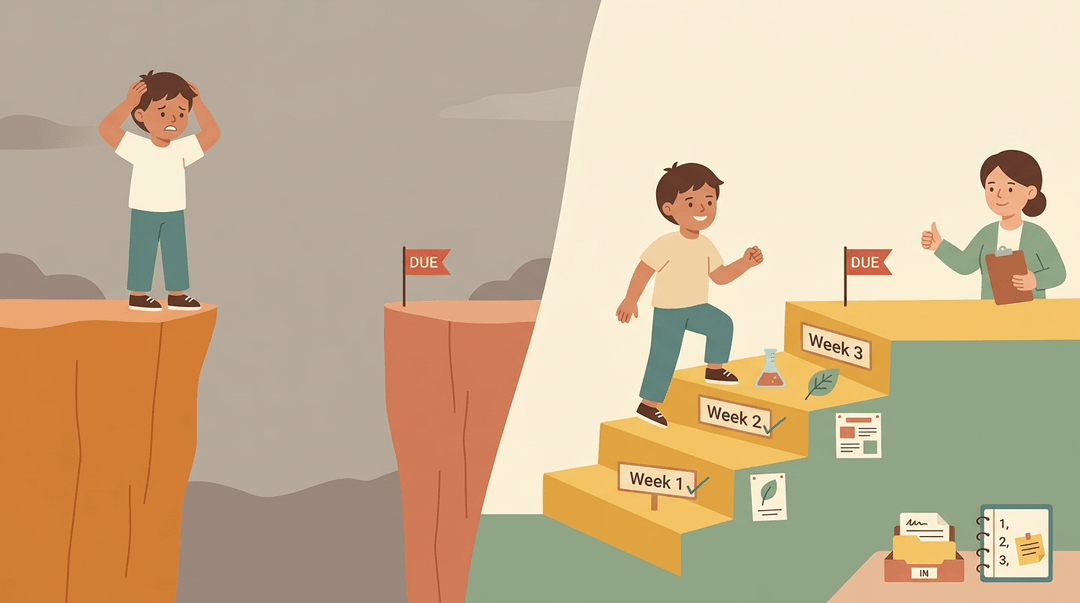
For long-term planning, split a big project into weekly checkpoints.
For example, a middle school science teacher with a three-week project adds a checkpoint each week. The student who used to panic at the due date starts asking, 'What's the next step?' One distant deadline feels like a cliff. Checkpoints feel like stairs.
Accommodations for Each Type of Need
Two students can share a seat and still need different supports. Here's how we group the most common needs so you can match the right tool to each student.
Supports for students with vision loss
- Braille and large print. Braille uses raised dots read by touch, and large print enlarges text.
- Screen readers and magnifiers. A screen reader reads on-screen text aloud, while a closed-circuit television (CCTV) magnifier enlarges printed pages.
- Verbal descriptions of visuals. Describe charts and maps out loud so every student gets the key takeaway.
- Electronic texts. Digital readings can be enlarged, read aloud, or sent to assistive technology.
Supports for hearing and speech needs
- Sign language interpreters. A qualified interpreter signs spoken instruction so a Deaf student follows the lesson in real time.
- Captioning. On-screen captions let students read along with videos and live speech.
- Assistive listening systems. A microphone sends your voice straight to a student's receiver or hearing aid, cutting through background noise.
- Voice-output technology. Devices that turn typed or selected words into speech let students join discussions.
Build these in before a student asks, not after. Access comes first.
Supports for students with limited movement
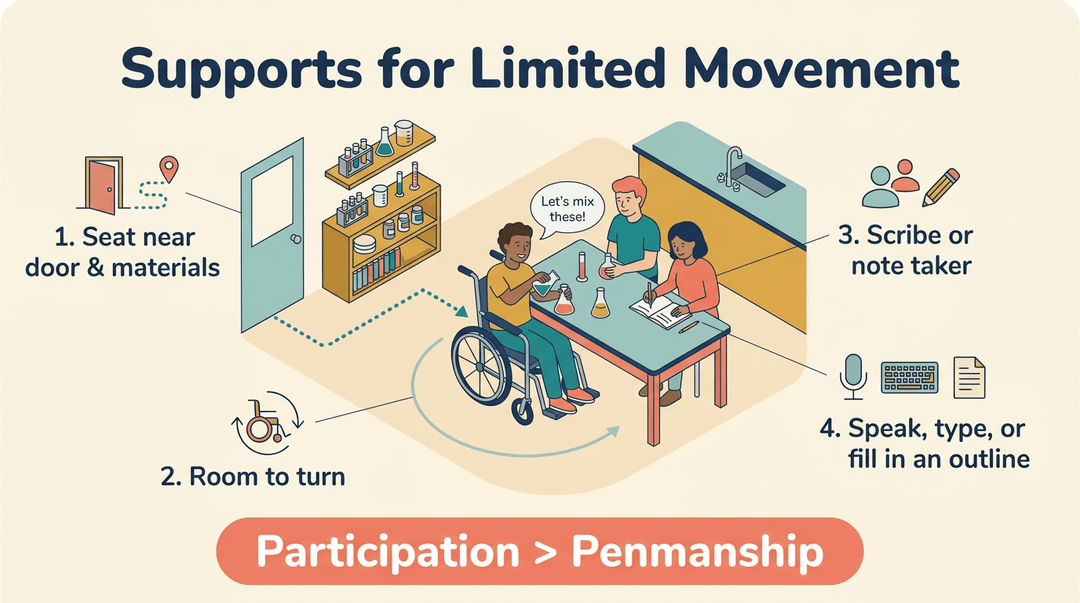
- Accessible location. Seat the student near the door and close to the materials they use most, along a clear path.
- Wheelchair space. Leave room to move and turn so the student can join group work without being moved aside.
- Scribes and note takers. A classmate or adult writes down what the student dictates or takes notes for them.
- Reduced writing load. Accept oral answers, typed responses, or a printed outline in place of heavy handwriting.
Consider a high school chemistry teacher who clears a path to one student's lab table and pairs that student with a note-taking partner. The student joins the experiment with the group.
The win here is participation, not penmanship.
Supports for ADHD and learning disabilities
Attention-deficit/hyperactivity disorder (ADHD) can affect focus and memory, so these supports target both.
- Movement breaks. Planned times to stand, stretch, or walk help students reset their attention.
- Memory aids. Checklists, word banks, and formula cards ease the load on working memory.
- Wiggle seats. Cushioned or movable seats let students shift while staying seated and engaged.
- Visual timers. A countdown shows how much time remains, so students don't have to guess.
- Notes help. Guided notes or a copy of your slides let students listen instead of scrambling to write.
Movement can be a support, not only a distraction.
Supports for autism and psychological needs
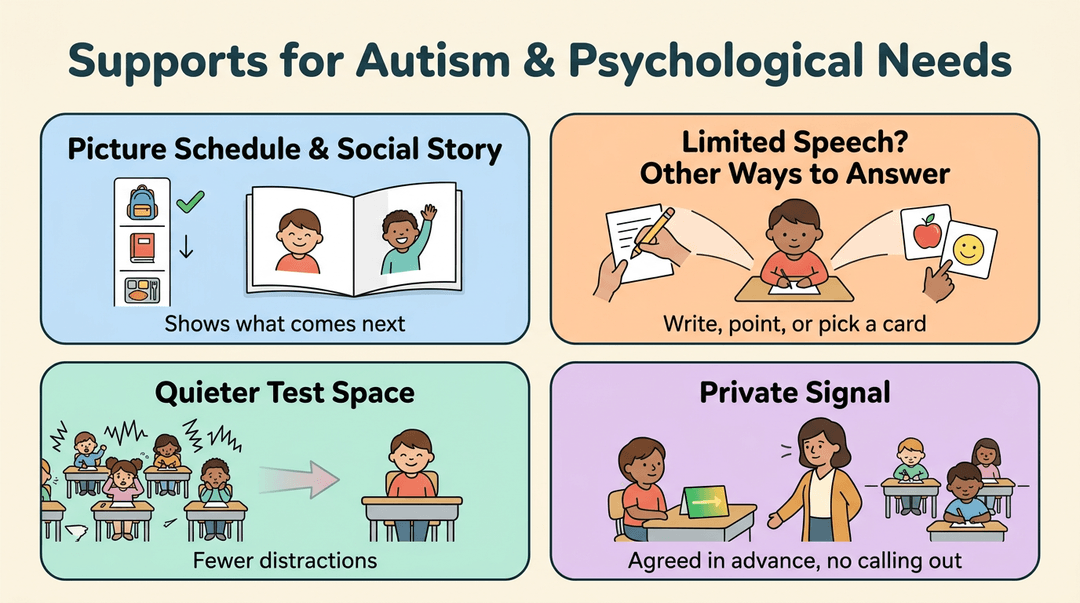
- Visual supports and social stories. Picture schedules and short personalized stories show students what to expect.
- Limited oral language. Students who speak little can respond by writing, pointing, or using picture cards.
- Alternate test location for anxiety. A quieter room or small group lets an anxious student test with fewer distractions.
- Signal for inappropriate behavior. A discreet cue agreed on in advance, like a card on the desk, lets you redirect without calling out the student.
Working with IEP Teams to Apply Supports
Accommodations only work when everyone uses them the same way. Here's how to work with the team around each student.
How IEP and 504 plans shape supports
Start with the paperwork. Accommodations in your student's Individualized Education Program (IEP) or Section 504 plan are part of the plan, so apply them as written and follow the team's guidance on using them.
Informal supports, like a front-row seat, help too, but they don't replace what's in the plan.
Parents are equal team members, so keep them in the loop. And don't forget your substitute plans: include the student's accommodations there so a sub knows what to provide.
Raising concerns with teachers as a team
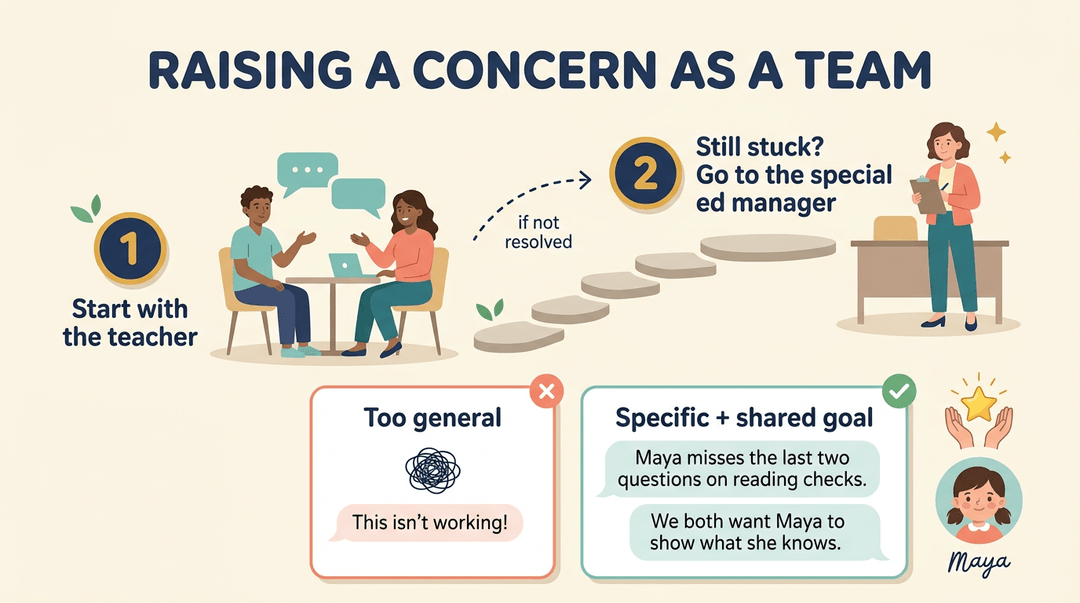
Raise concerns in order:
- Start with the teacher. Talk directly with the teacher delivering the lesson.
- Escalate to the special education manager if the issue isn't resolved.
Focus on specific issues, like "Maya misses the last two questions on reading checks," rather than general frustration. Approach it as a team by framing the talk around a shared goal: "We both want Maya to show what she knows."
Matching each support to a student's needs
Each accommodation should answer a specific need. Ask what the student struggles with, then pick the support that closes that gap without changing the lesson's expectations.
Consider a seventh-grade science teacher whose student has extra time on quizzes but keeps running out of time. Instead of extending every quiz, she finds the real struggle is with long reading questions. Now the support targets the real problem.
Keep supports consistent across classes and days. A support that shows up in math but vanishes in science leaves a student guessing. Consistency is the goal.
Review each support regularly, too. When a student no longer needs one, plan fading it gradually with the team rather than dropping it overnight.
Peer support and meaningful inclusion
Peer tutors and buddies can help a student find the right page or rehearse new vocabulary. Meaningful participation means a real role, like answering questions or leading one part of a group task.
Inclusion is a spectrum, not all or nothing, so a student might join science but work in a small group for math. Avoid geographical inclusion, where a student shares the room but not the learning. Being in the room isn't the same as being included in it.
Supports in specialized school settings
- Small classes, aware teachers. Smaller groups and teachers who understand learning differences make it easier to catch needs early.
- Preventative planning. Build supports in before a predictable struggle, like a long writing task.
- Parent support groups. Connect families with others who've been there, and point parents toward them.
- ADHD differences by gender. Attention-deficit/hyperactivity disorder (ADHD) can look different in girls and boys. The National Institute of Mental Health (NIMH) notes that boys and men tend to show more hyperactive and impulsive symptoms, while girls and women are more likely to be diagnosed with inattentive ADHD. Plan for each student's actual needs, not assumptions about gender.
When supports are planned in advance, they stop being a scramble and become part of how you teach. Accommodations help students show what they know, and they make your classroom work better for everyone in it.
Ready to build supports into your next unit? Check out our Lesson Planner to write, organize, and reuse lesson plans across multiple classes from one place.
References
- Reducing classroom sedentary behaviour: a scoping review of interventions and student involvement — pmc.ncbi.nlm.nih.gov (2025)
- Attention-Deficit/Hyperactivity Disorder: What You Need to Know — nimh.nih.gov
- Implementing Universal Instructional Design In Postsecondary Courses And Curricula — doi.org (2009)
- Accommodations vs. Modifications — peatc.org
Frequently asked questions
What is the difference between accommodations and modifications in education?
Accommodations change how a student accesses instruction or demonstrates learning, while keeping the learning goals the same. Modifications change what the student is expected to learn, such as by altering objectives or assigning different content.
What are reasonable accommodations?
Reasonable accommodations are practical changes that help a student access the same learning as classmates or demonstrate what they know. Examples include extra time, large-print materials, a quiet testing space, or answering orally instead of in writing.
What are some examples of accommodations that are commonly used in the classroom?
Common classroom accommodations include extra time, quiet or preferential seating, large-print materials, read-aloud or text-to-speech tools, visual schedules, chunked assignments, guided notes, and checklists. Students may also type or dictate answers, use graphic organizers, or take breaks.