Vertical Alignment: What It Means and Why It Matters

Jump to section
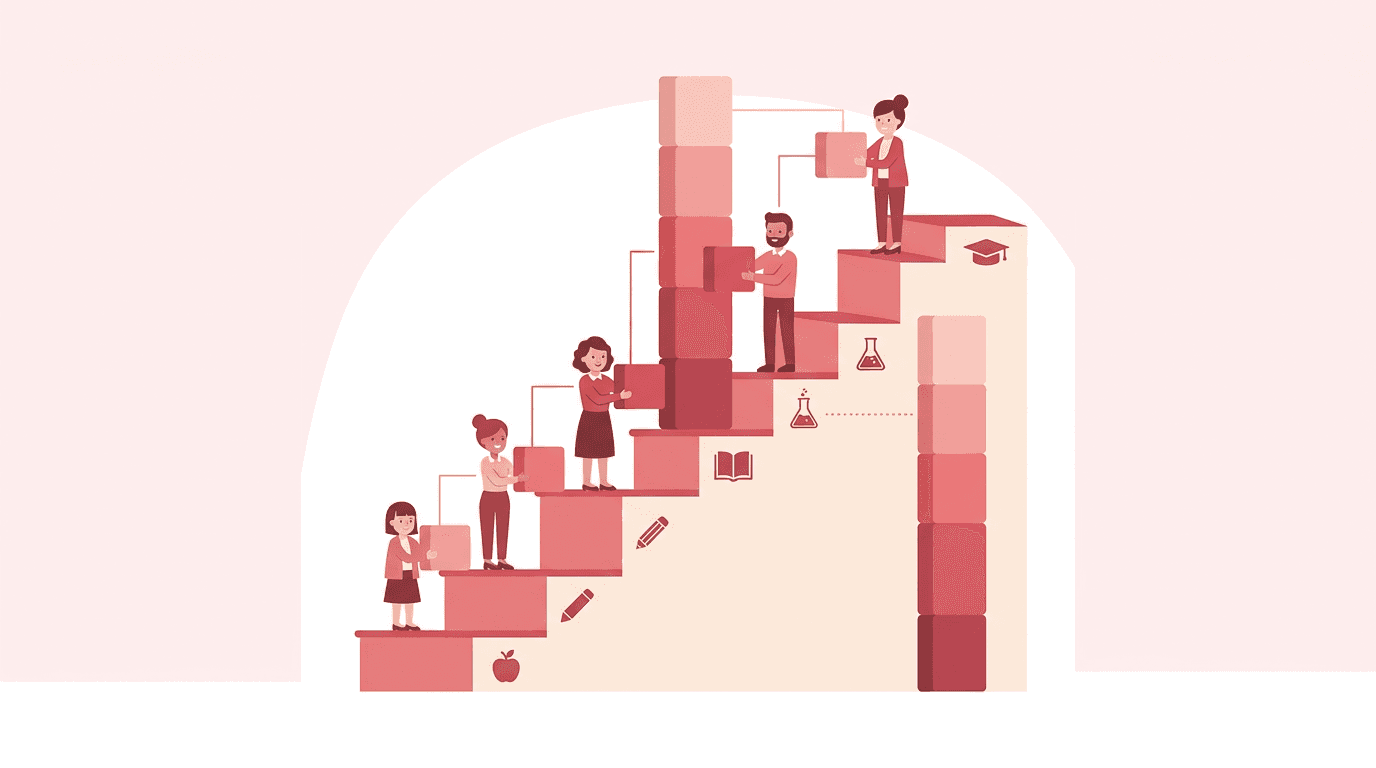
Think of a relay team. Each runner only wins if the baton passes smoothly from one leg to the next. Curriculum works the same way. When each grade builds on the one before it, students carry skills forward instead of starting over every year.
That connected design is called vertical alignment. It means making sure what you teach in one grade lines up with what comes before and after it. Here's what it means, why it matters, and how to check your own work.
We'll cover the definition, the standards frameworks that shape it, and how it plays out for students with diverse needs. We'll finish with a checklist you can run this week.

What Vertical Alignment Means in K-12 Curriculum
Ever wondered what your students walked in knowing, or what they'll need next year? That's the heart of vertical alignment. Here's what it means, why it matters, and how to check it this week.
Why vertical alignment matters across grade levels
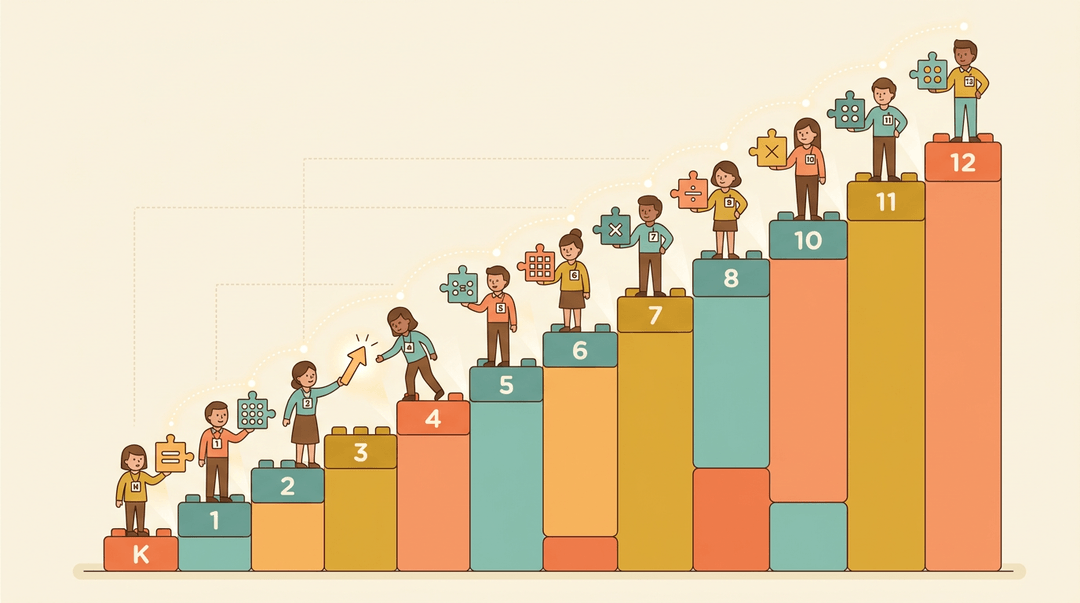
Vertical alignment is the practice of lining up what each grade teaches so skills build on one another from year to year. Horizontal alignment matches what happens within one grade across classrooms, while vertical alignment runs up and down the grades.
It's less about what one teacher covers and more about how the whole K-12 sequence fits together.
Think of a fourth-grade teacher introducing multiplication strategies. If she knows the third-grade team already covered arrays and equal groups, she can build on that instead of starting over.
Primary teachers set the foundation, and secondary teachers see how those early skills show up later. Both sides benefit from knowing what's happening above and below their grade.
Collaborating with teachers across grade levels
Your colleagues down the hall are an underused resource. A short cross-grade conversation can tell you more about your students than hours of solo planning. Try a 45-minute alignment meeting with this agenda:
- Share one standard each grade teaches that connects to yours.
- Bring a sample student task and discuss what it demands.
- Agree on one shared vocabulary term every grade will use.
- Set a date to revisit the plan.
Collaborative curriculum implementation works best when teams adjust together rather than one grade changing alone.
Closing learning gaps between grades
The COVID-19 pandemic affected student assessment scores, and Brookings found that average learning losses five years later still near or exceed an upper threshold in ELA (English language arts) and math.
The result is scattered achievement levels that you need to monitor when evaluating academic progression.
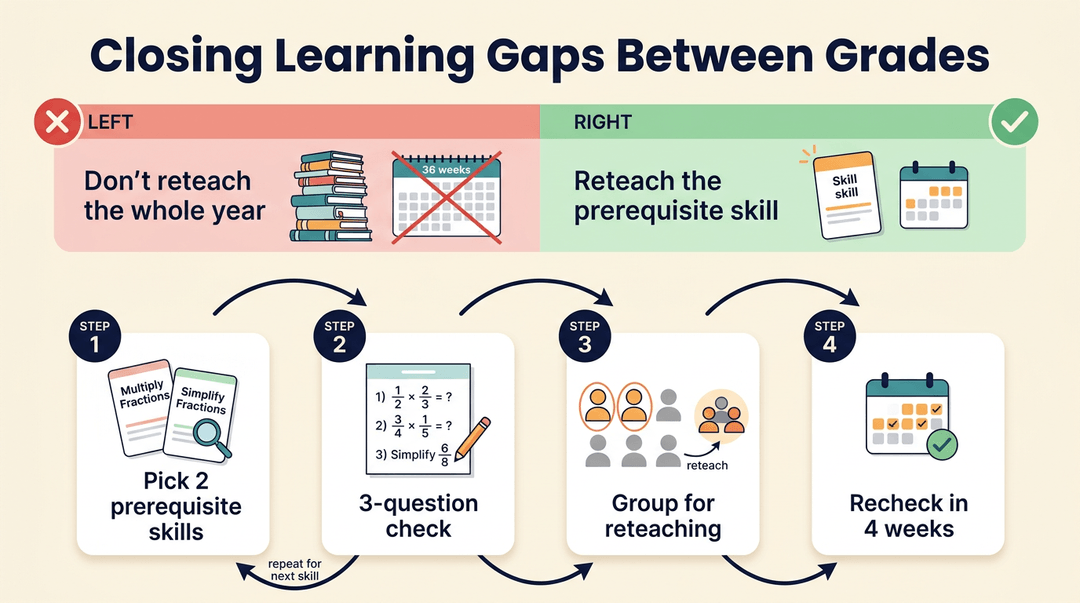
Bridging content gaps means reteaching the prerequisite skill, not the whole year. Small gaps are easier to close than big ones. Use this quick diagnostic checklist:
- Pick two prerequisite skills from the previous grade.
- Give a three-question check at the start of the unit.
- Group students who can't yet do it for targeted reteaching.
- Recheck in four weeks.
Aligning curriculum with state standards
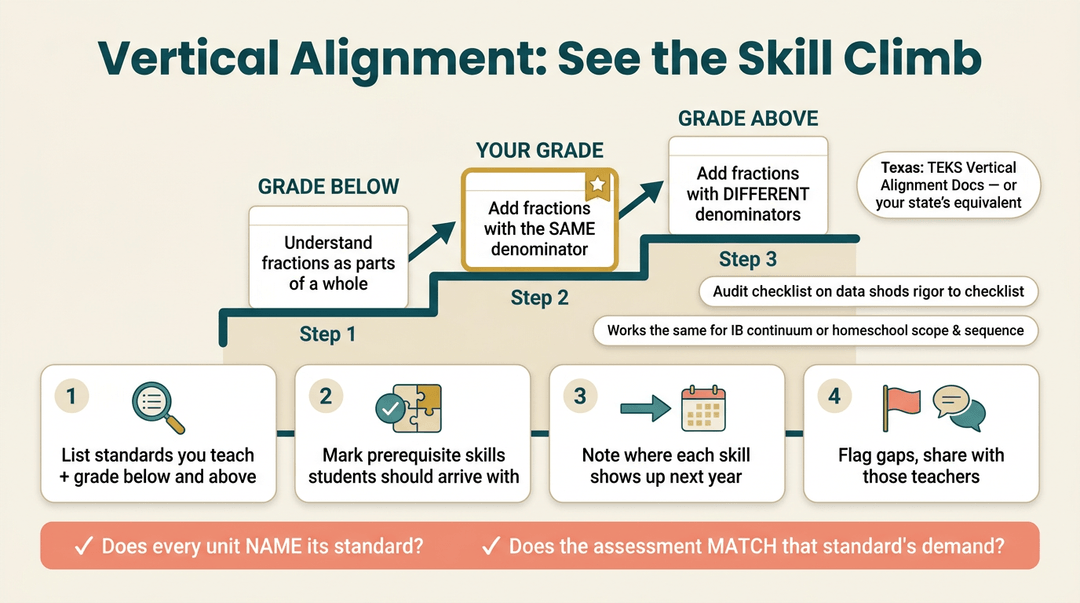
Texas teachers can use TEKS (Texas Essential Knowledge and Skills) vertical alignment documents to see how a standard develops from grade to grade. Look for your own state's equivalent.
Score your plan with a rubric of effective practices and a quality indicator: does every unit name the standard it targets, and does the assessment match that standard's demand?
Here's a step-by-step audit:
- List the standards you teach and the grade just below and above yours.
- Mark which prerequisite skills students should arrive with.
- Note where each skill shows up next year.
- Flag gaps and share them with the teachers who own those grades.
If you teach in an IB (International Baccalaureate) school or homeschool, the continuum works the same way. Map your sequence against the level before and after yours.
Vertical alignment for students with disabilities
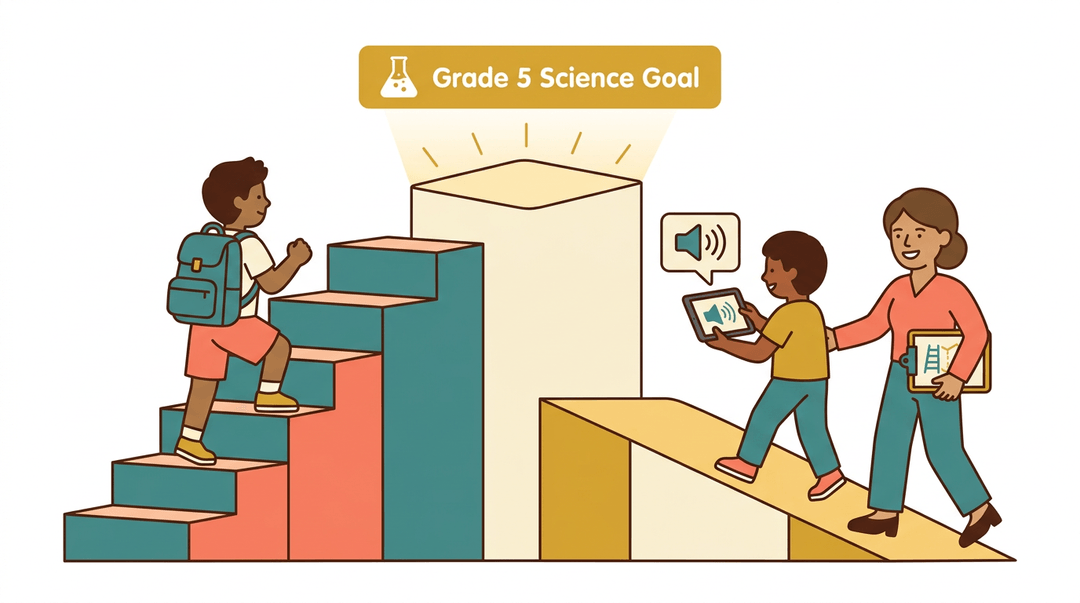
For students with significant cognitive disabilities, the goal is still grade-level content with the right supports.
The Institute on Community Integration explains that academic rigor should be maintained while applying the least dangerous assumption, the default that a student can learn unless evidence shows otherwise.
The same source notes that students with intellectual disabilities can make progress on the same academic content as their grade-level peers.
Consider a special education teacher adapting a fifth-grade science lesson for a student's IEP (Individualized Education Program).
Using the vertical documents, she sets a goal tied to the prior grade's skill, then offers a text-to-speech tool so the student can access the same reading.
Complex access needs call for alternate paths to the same content, and ARD (Admission, Review, and Dismissal) teams can use the vertical map to set goals. Administrators can support this by scheduling shared planning time.
Tools for rigorous, accessible instruction
Use curriculum framework videos and monthly instructional guides to refresh your understanding of the sequence. Make standards accessible by rewriting them in student-friendly language, and teach prerequisite skills explicitly before the grade-level task.
Keep the work demanding: rigor and access work together.
A pacing guide crosswalk shows where skills connect:
| Grade level | What students need first | Where it shows up next |
|---|---|---|
| Grade 3 | Equal groups | Grade 4 multiplication |
| Grade 4 | Multiplication strategies | Grade 5 fraction work |
Small, consistent checks keep the whole K-12 map honest.
A Teacher's Checklist for a Vertical Alignment Study
Use this playbook when you want to see how your grade's content connects to the grades before and after it. Run the three phases in order. Each one fits in a planning period or a single team meeting.
Phase 1: Gather the standards
- Pull your grade-level standards
- Print only one strand at a time, such as fractions or argument writing.
- Map that strand across grade bands
- Make one column per grade, from one below yours to one above.
- Note the prerequisite skills
- Jot the chain: multiply fractions ← equivalent fractions ← unit fractions.
Keep it to one page. A map you can read at a glance is a map you'll actually reuse.
Phase 2: Meet the adjacent grades
You can't see gaps from inside your own classroom, so bring in the neighbors.
- Invite adjacent grade teachers
- One teacher from the grade below and one from above is enough.
- Compare pacing guides side by side
- Mark when each skill is first taught and when it's assumed.
- Flag content gaps and overlaps
- Use the table below to label what you find.
Open the meeting with one question. Say: "What do you expect students to walk in already knowing?"
| When you see... | Label it... |
|---|---|
| A skill assumed in one grade but never taught earlier | Gap: decide who teaches it |
| The same skill at the same depth in two grades | Overlap: trim one or deepen one |
| A skill taught months before it's used | Timing gap: consider moving it closer |
Example: A fifth-grade teacher and a fourth-grade teacher compare pacing guides. Fifth grade assumes students can find equivalent fractions, but fourth grade only touches them in the last week. They agree to move that unit earlier, so students arrive ready instead of reteaching in October.
Phase 3: Adjust and document
- Revise your scope and sequence
- Move, add, or trim units based on your gap and overlap labels.
- Update your learning progressions
- Rewrite the skill chain so it shows the new order.
- Record every change for review
- Log it in a shared table like the one below.
| Skill | Change | Grades affected | Review date |
|---|---|---|---|
| Equivalent fractions | Moved from week 36 to week 12 | 4, 5 | End of semester |
⚠️ Watch out: Don't revise only your own grade and move on. Share the log with your neighbors, or the gaps will simply move.
At a glance:
| Phase | Key move | What you get |
|---|---|---|
| 1. Gather | Map one strand across grades | A one-page skill chain |
| 2. Meet | Compare pacing with neighbors | Labeled gaps and overlaps |
| 3. Adjust | Revise and log changes | A sequence others can review |
Map standards across grade levels and build your scope-and-sequence collaboratively in EMStudio's Curriculum Planner.
Using CSS Vertical Alignment Utilities
Vertical alignment in code is a lot like deciding where items sit on a shelf. These utilities let you set that placement, and the choice you make changes how the whole page reads.
The vertical alignment classes available
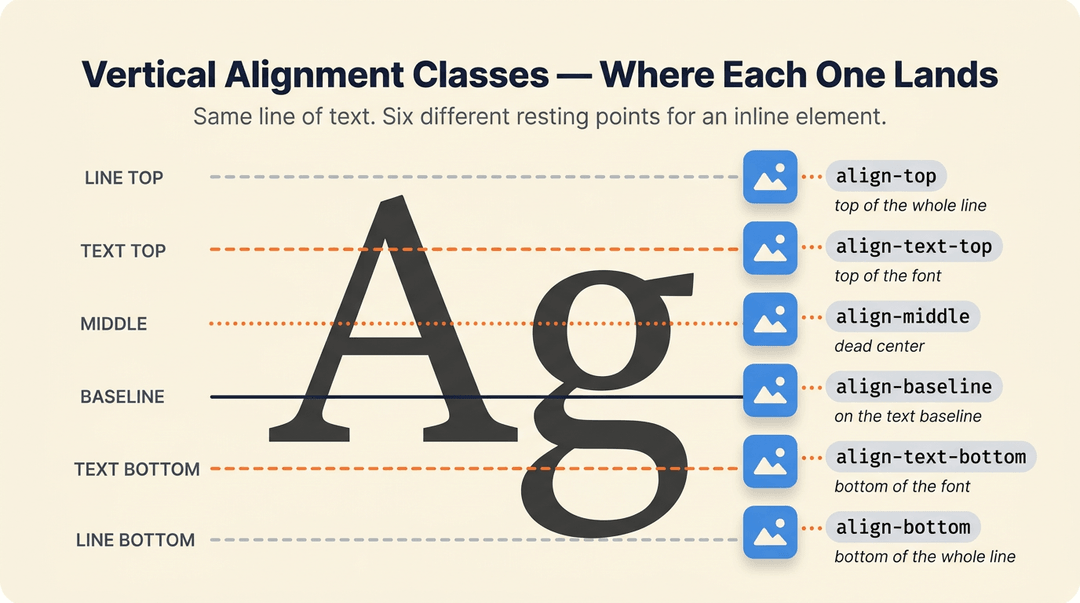
Your framework gives you a short set of classes, each controlling where an element sits relative to its line or parent:
- align-baseline: lines the element up with the baseline of its parent.
- align-top: pins the element to the top of the line.
- align-middle: centers the element vertically.
- align-bottom: pins the element to the bottom of the line.
- align-text-top and align-text-bottom: align the element to the top or bottom of the parent's font.
When to use each alignment class
Each class answers a different question. Use baseline when text and a small icon need to share one line. Choose top or bottom when one element is taller than its neighbors and you want everything lined up against it.
Pick middle to center an element within its parent. For a word sitting beside an image, text-top or text-bottom matches the font rather than the full line.
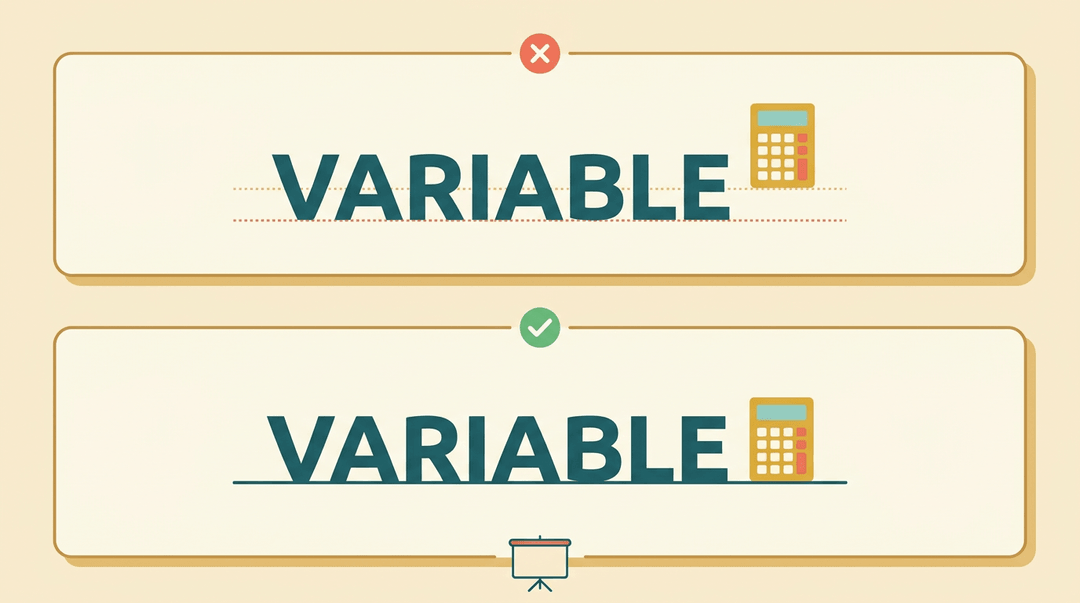
Consider a middle school math teacher who places a small calculator icon beside a bolded vocabulary term. With align-baseline, the icon sits on the same line as the word, so the slide looks tidy instead of floating.
It's less about whether things align and more about where they sit. Small detail, big difference.
Adjusting alignment at different screen sizes
Sometimes an element should sit one way on a phone and another way on a laptop. Add a breakpoint prefix to the class name. Breakpoints are the screen widths where the layout changes, and the prefix tells the framework which one to apply the rule to.
You can use one prefix for a tablet-width rule and another for a desktop rule. Your framework generates these responsive versions by default, so you usually won't need to write each one by hand.
Setting up hover-state alignment
Hover states let an element shift when a reader points at it. First, enable the hover-state class in your configuration so the hover variant of each alignment class is available.
Next, handle the Sass variable setup. Sass is a stylesheet language, and its variables let you list only the hover options you need, so you don't ship extras. Finally, run the CSS recompilation step.
The stylesheet won't change until you rebuild it, and skipping this step means your hover styles simply won't appear.
When grade levels build on one another, students stop relearning the same ideas and start going further. Vertical alignment doesn't require a total overhaul. It starts with honest comparisons, a few targeted questions, and steady follow-up.
Ready to map your standards across the whole year? Check out our Curriculum & Standards tools to plan units, lessons, and standards in one place.

References
Frequently asked questions
How can I vertically align text in HTML?
Use CSS to control vertical text alignment. For inline elements, apply utilities such as `align-middle`, `align-top`, `align-bottom`, or `align-baseline`; for example, `<span class="align-middle">Text</span>`. To center text within a larger container, CSS Flexbox with `align-items: center` is often the most reliable approach.
How to center text on a table in Word?
Select the table cells, then open the **Table Layout** tab in Word. In the **Alignment** group, choose the middle-center alignment icon to center the text both vertically and horizontally.
Where can we change the vertical alignment?
Vertical alignment can be changed through the element’s CSS or through alignment controls in an application. In CSS utility frameworks, common options include `align-top`, `align-middle`, `align-bottom`, `align-baseline`, `align-text-top`, and `align-text-bottom`.
What do you mean by vertical alignment?
Vertical alignment is the practice of positioning content from top to bottom within a line, cell, or parent element. In education, it also means sequencing curriculum so skills taught in one grade build on skills from earlier grades and prepare students for later learning.